Customize Your Driver Board with the RP2040
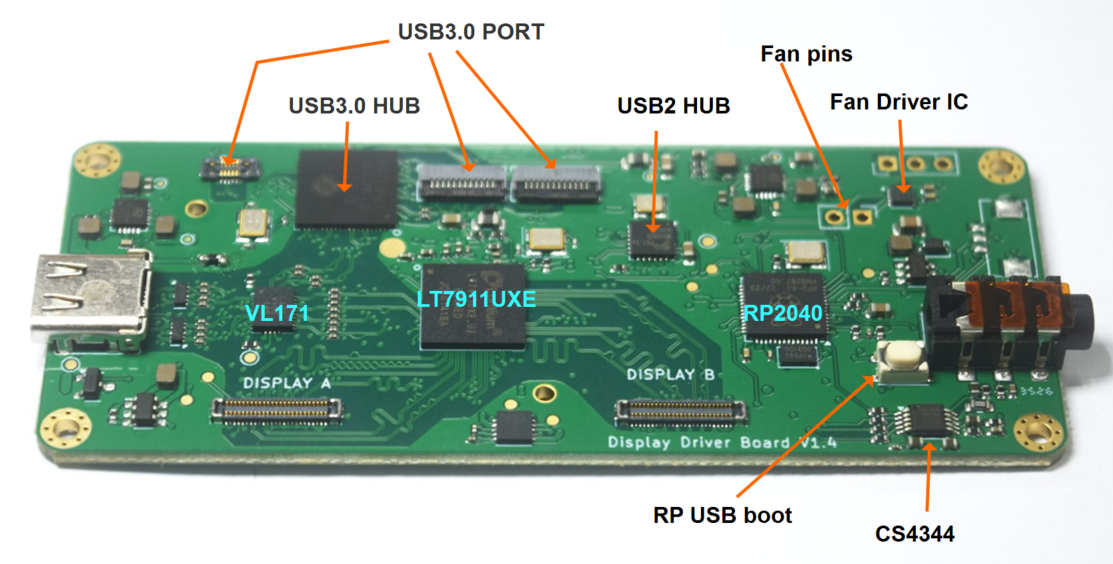
This driver board includes an onboard RP2040 microcontroller. It manages power-on sequencing for the UXE chip, displays, and USB3 chip, while providing several customizable controls. Our C demo gives you a starting point—you can modify it yourself or with help from AI coding tools.
Here is a demo code for your reference: https://github.com/alex-chuf/RP2040-Demo-Code-to-control-display-driver-board/
Display refresh rate
Select the startup refresh rate through GPIO15: LOW for 90 Hz or HIGH for 60 Hz. In user_controls_init_before_power_on(), edit the last line that sets REFRESH_SEL_PIN:
gpio_put(REFRESH_SEL_PIN, 0); // 0 = 90 Hz, 1 = 60 HzDisplay brightness
Control backlight brightness using PWM on GPIO0. To set a fixed brightness, change 180 in the following line:
pwm_set_wrap(slice, 255);
pwm_set_chan_level(slice, PWM_CHAN_A, 180);  // Adjust this value
With this configuration, PWM values range from 0 to 256. A value of 180 gives approximately 70% duty cycle; this does not necessarily mean 70% display brightness. You can also extend the firmware to accept brightness commands from your host computer.
Board temperature monitoring
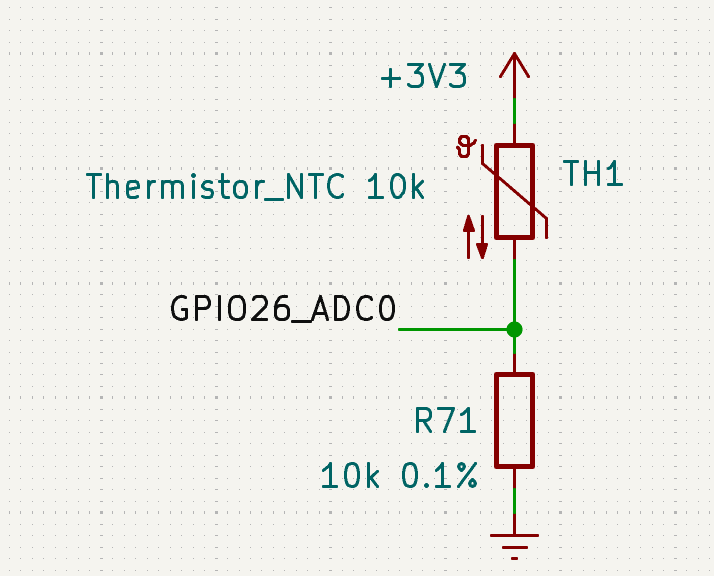
Read the onboard NTC sensor through GPIO26 (ADC0) to monitor temperature changes:
adc_select_input(0);  // ADC0 = GPIO26
uint16_t raw = adc_read();
float voltage = raw * 3.3f / 4095.0f;
The demo reads the sensor’s voltage. Converting this voltage to a temperature in °C requires an additional calculation based on the NTC sensor and its circuit.
here is the NTC part number at LCSC: https://www.lcsc.com/product-detail/C2892547.html
Cooling fan control
GPIO20 and GPIO21 control a connected cooling fan. The demo automatically switches the fan on and off using these adjustable NTC voltage thresholds:
#define FAN_ON_THRESHOLD_V   2.10f  // Fan ON above this voltage
#define FAN_OFF_THRESHOLD_V  1.95f  // Fan OFF below this voltage
Change these values to adjust when the fan runs. Keep the ON threshold higher than the OFF threshold to prevent frequent switching. Between the two thresholds, the fan keeps its current state.
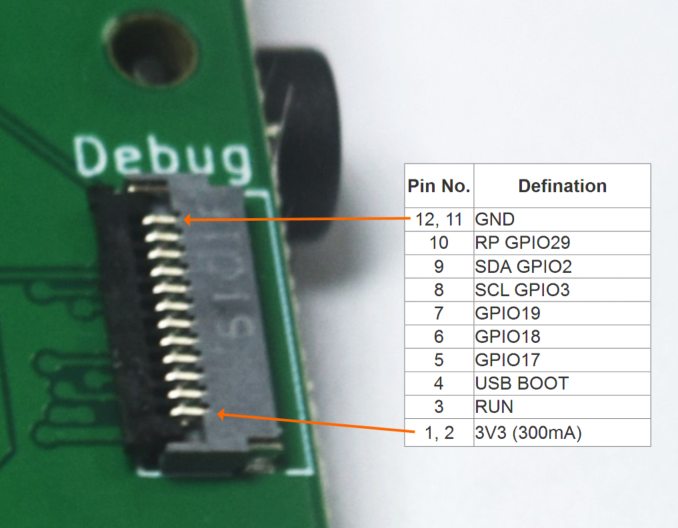
For additional features, there is an expansion FPC connector on the back side of the board (close to the audio jack), it provides:
- I²C: SCL on GPIO3 and SDA on GPIO2, for connecting your own sensors.
- Digital I/O: GPIO17, GPIO18, and GPIO19, for buttons, LEDs, or other custom controls.
- Analog input: GPIO29 (ADC3), for reading an additional analog signal.
- Other connections: 3.3 V, GND, RUN, and USB_BOOT.
- Connector part number: FH34SRJ-12S-0.5SH(50), 0.5mm space
These expansion pins are available for your own projects; add the corresponding control code to the demo to use them.